Your heavy equipment fleet, wherever it’s working.
wearpoint is Canadian-built inspection and hour-tracking software for mixed fleets of heavy equipment. Operators run the walkaround and log hours on their phones. You see what’s down, what’s open, and what’s due, across every site.
Forklifts · loaders · excavators · telehandlers · skid steers · MEWPs
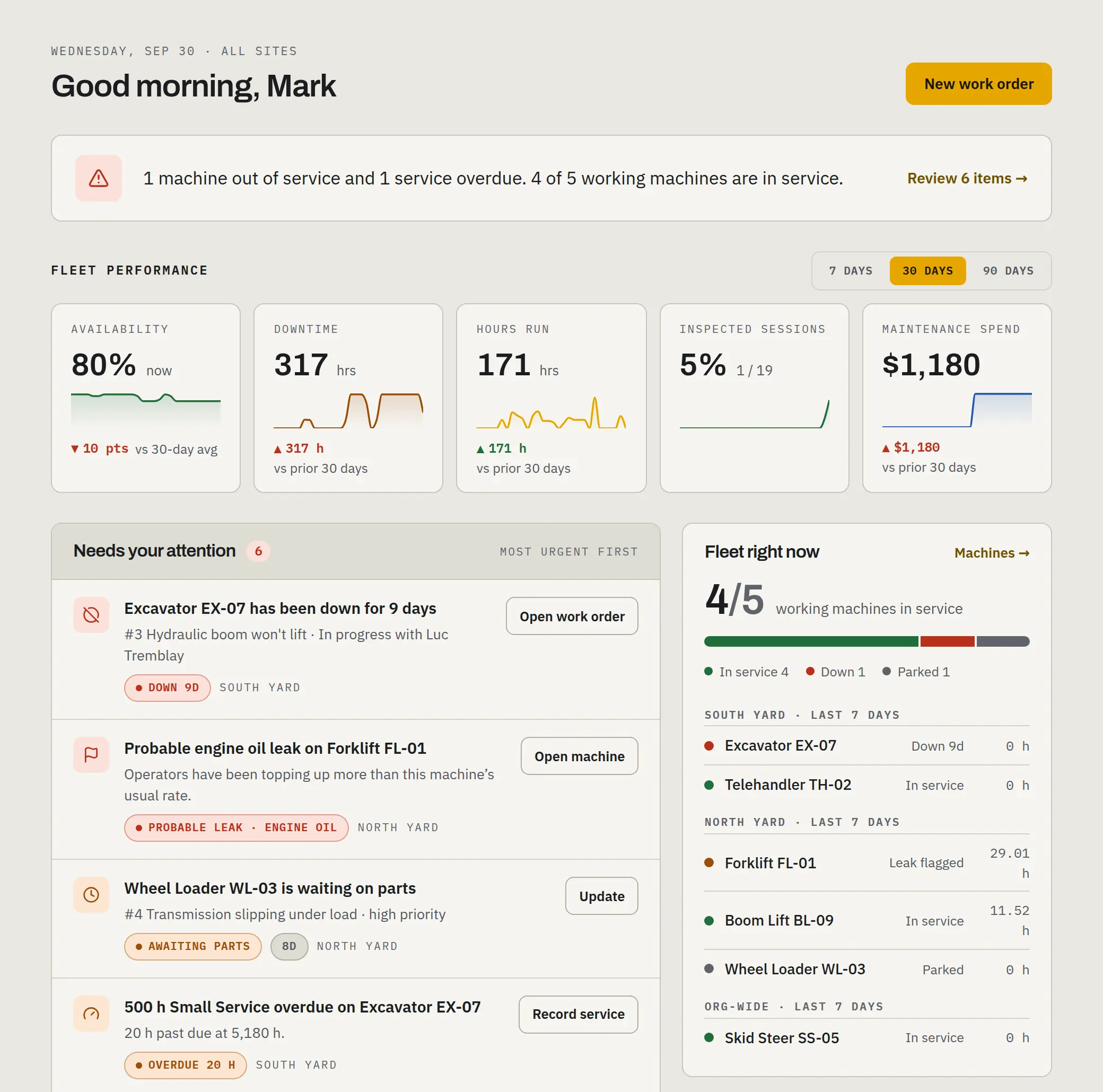
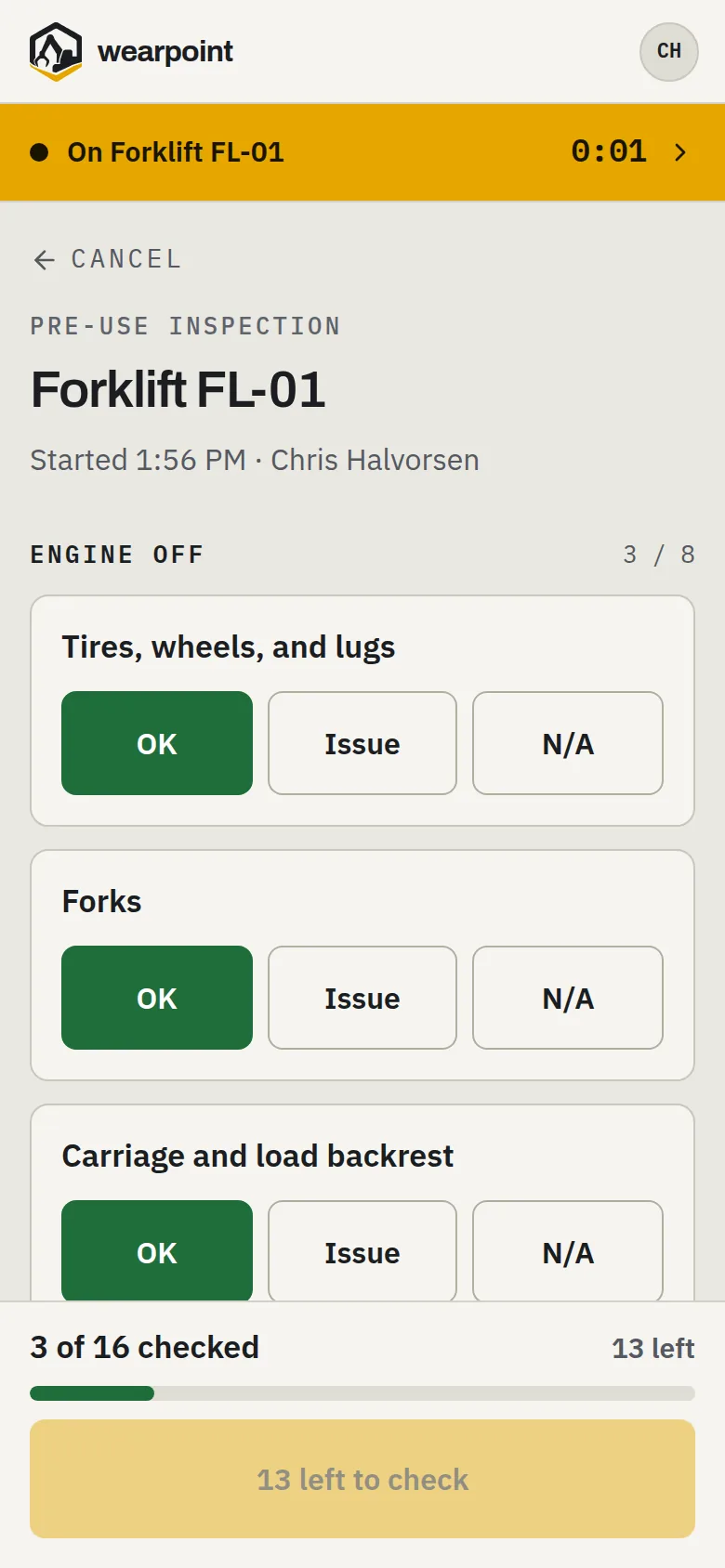
Equipment downtime. Know the moment a machine goes down.
When an operator flags a problem, it reaches the shop as an issue, ready to become a work order, and the right people get an alert when a machine is out of service. You see what’s down, why, and for how long, and the machine goes back in service when its last repair is closed.
Machine hour tracking. Service on real hours, not guesses.
Hours come from the meter reading operators enter when they finish on a machine, so service comes due on actual use, utilization builds itself, and you never chase anyone for numbers. Hours on the meter that no session explains are flagged as untracked use.
Volvo L120H
Wheel loader · 2021
Service meter
12,480hrsMaintenance records. The binder, digitized.
One page per machine: live hours, service history and what's due next, signed-off inspections, fluid history, open issues, and the work-order log — the whole paper trail in one place, current as of the last tap.
Hyster H155FT
Forklift · 2017
Service meter
9,203hrsFluid tracking. Machines tell on their leaks.
When a machine starts using three times its usual hydraulic oil, you hear about it. It’s flagged as a probable leak from the top-ups your crew logs — before it becomes a blown pump and a down day.
Pre-shift inspections. Defects don’t get lost between shifts.
Every inspection lands on the machine’s record with a verdict for each item — OK, Issue, or N/A. Open defects follow the machine until someone actually fixes them. No pencil-whipping: checks finished suspiciously fast, checks answered mostly N/A, and a defect answer changed before sign-off are flagged to owners and the site’s managers.
Built for fleets that get worked hard.
Same walkaround, same meter, different work. Start with the one that looks like yours.
Scrap & recycling
Excavators, loaders, and forklifts working the hardest duty cycle there is.
Snow removal
Sidewalk machines, loaders with pushers, and the hour log that settles the invoice.
Construction & demolition
Excavators, dozers, graders, and the compact iron in between — inspected before the shift, metered by the hour.
Farming
Tractors, combines, sprayers, and windrowers — inspected before they head out, serviced on the hours they actually run.
Compliance. The inspection you already owe someone.
Inspecting your equipment is a legal duty, not a nice-to-have. The question is whether you can prove it happened.
The duty
OSHA 1910.178(q)(7) requires powered industrial trucks to be examined before being placed in service. Canadian codes carry the same duty in their own words: Alberta's OHS Code s.257 requires a visual inspection before powered mobile equipment is operated, and BC's OHSR 16.3 requires an inspection before mobile equipment is first operated on a shift, with defect records kept for two years.
The proof
Every wearpoint inspection is a signed-off record with verdicts, timestamps, and who flagged every defect — a trail that stands up when an insurer’s loss-control auditor asks for it. The coverage report lists the sessions run with no check, the late checks and the untracked hours.
The teeth
A machine with a defect doesn’t quietly stay in rotation: defects reach the shop as issues to triage into work orders, down machines are flagged to the people who need to know, and open defects follow the machine until they’re fixed. A failed check ends the operator’s session, and a critical defect reaches the site’s managers.
Common questions.
What does it cost?
A flat rate per machine per month, plus applicable taxes. The whole crew is included with no per-user fees, and the AI features are included too. It starts with a 7-day free trial; see pricing for the current rate.
Our machines are spread across job sites. Can we still see all of them?
Yes. Every inspection, hour reading, and defect is logged from the operator’s phone wherever the machine is working, so you see every machine’s status in one place. Group machines by site, and managers see the sites they run. It shows status, not location: there’s no GPS tracking.
How long does setup take?
Most fleets run their first inspections the same day. Add your machines, build an inspection checklist from what your crew already checks, and invite the crew by text. Or have us set it up: we load your machines and build your checklists before the crew’s first login.
Will my crew actually use it?
That's the whole design problem, and it's why every screen has one dominant action sized for gloves. An operator taps the machine, works through a short checklist, taps out. No forms, no menus, no training course.
Do we need new hardware or an app download?
No. It runs in the browser on any phone or tablet — the one in the operator's pocket works — and it can be added to the home screen like any other app. Nothing is bolted to the machine, and there's no telematics to install.
What if there's no signal on site?
Where signal drops, answers stay on the phone and the inspection keeps the time it was done. The phone sends everything in order once it's back in range, and shows what hasn't gone out yet.
What machines does it handle?
Forklifts, loaders, excavators, telehandlers, skid steers, MEWPs, generators, and compressors. If something you run isn't on that list, ask us before you start.
Is wearpoint a CMMS?
Not a full one. It covers the maintenance work a fleet needs every day — hour-based service schedules, work orders, the repair log, and each machine's history — built around the operator's walkaround. A mechanic can note the part number on a repair, but it doesn't keep a parts inventory, do purchasing or accounting, or sync with other software.
How do machine hours get recorded?
The operator taps in on the machine they're running and enters the hour-meter reading when they tap out. That reading keeps the machine's hours current and drives its service schedule. A reading that implies more than 24 hours a day is refused, so a typo can't throw the schedule off. Utilization builds from the tap-in and tap-out sessions. Nothing is wired to the machine.
Where is our data stored?
Your records are stored in Canada, and the app runs there too. Some of the services we rely on, such as our web hosting network and our providers for email, text messaging, error monitoring, and the optional AI features, may process data in the United States. The privacy policy lists each provider.
Is it available in French?
Yes. The app's screens, invitations, and text messages are in English and Canadian French. Invitations go out in the language you choose for each person, and anyone can switch the app to their own language. Your checklist items appear exactly as you write them.
Can I just sign up?
Yes. Start a 7-day free trial with a card — it covers up to 3 machines, and you pay nothing if you cancel before it ends. If you’d rather we did the setup, we can do that too.
See it on your own machines.
Start a free trial and run your first inspection today — or have us load your machines, build your checklists, and invite your crew for you.